


Check the Back of Your Apple Watch
The easiest way to find your Apple Watch case size is by checking the engraving on the back of your watch.
Turn your Apple Watch over and look for the information engraved around the sensor area. You will find the case size listed, such as:
- 38mm
- 40mm
- 41mm
- 42mm
- 44mm
- 45mm
- 46mm
- 49mm
Your case size determines which Apple Watch band size is compatible with your device.

Method 2: Check Your Apple Watch Size Using the Watch App on iPhone
You can also find your Apple Watch size directly from your iPhone.
Follow these steps:
Step 1:
Open the Watch app on your iPhone.
Step 2:
Tap “All Watches” in the top-left corner.

Step 3:
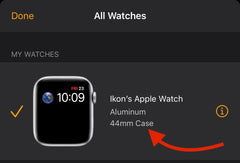
Select your Apple Watch and check the listed case size information.
Your Apple Watch model and case size will be displayed, allowing you to choose the correct replacement band.
Find the Right Apple Watch Band Size
Once you know your Apple Watch case size, select the matching band size below.
Choose 49mm Apple Watch Bands
Compatible with:
- Apple Watch Ultra
- Apple Watch Ultra 2
Choose 46mm / 45mm / 44mm Apple Watch Bands
Compatible with:
- 46mm Apple Watch Series 10
- 45mm Apple Watch Series 7, Series 8, Series 9
- 44mm Apple Watch Series 4, Series 5, Series 6, and Apple Watch SE
- 42mm Apple Watch Series 1, Series 2, and Series 3
Choose 42mm / 41mm / 40mm / 38mm Apple Watch Bands
Compatible with:
- 42mm Apple Watch Series 10
- 41mm Apple Watch Series 7, Series 8, Series 9
- 40mm Apple Watch Series 4, Series 5, Series 6, and Apple Watch SE
- 38mm Apple Watch Series 1, Series 2, and Series 3
Still Not Sure Which Apple Watch Band Size You Need?
If you are unsure about your Apple Watch size, check the engraving on the back of your watch or use the Watch app on your iPhone before ordering.
Choosing the correct size ensures your Apple Watch band fits securely, feels comfortable, and works perfectly with your device.
